Building English Grammar App: When Memorization Isn't Enough
A Tale of Two Learners
Recently, I’ve been teaching English to my son and daughter at home. That’s when I noticed something interesting—and humbling.
My son had always learned grammar through memorizing texts. He would recite passages until they were second nature, and somehow the grammar rules just clicked into place. It worked beautifully for him.
My daughter? A completely different story.
She could recite texts just as flawlessly as her brother—word perfect, pronunciation spot-on. But when it came to grammar exercises, she would make the same mistakes over and over again. The same tense errors. The same preposition confusion. The same article mishaps.
This was a revelation for me. Memorization works for some children, but it isn’t a universal solution. Some learners need explicit, focused practice with immediate feedback. They need to see their mistakes, understand why they’re wrong, and try again—right away, while the concept is still fresh.
What’s Wrong with Existing Tools?
I went looking for grammar practice tools. What I found disappointed me.
Most tools felt like digital worksheets from the 1990s. No engagement. No flow. You answer a question, submit, wait for the page to reload, then maybe get a vague explanation. It felt like a chore, not learning.
Others hid the good stuff behind paywalls. Free tiers would let you do a handful of exercises, then ask you to subscribe. I understand businesses need revenue, but it felt wrong to gate-keep basic grammar practice.
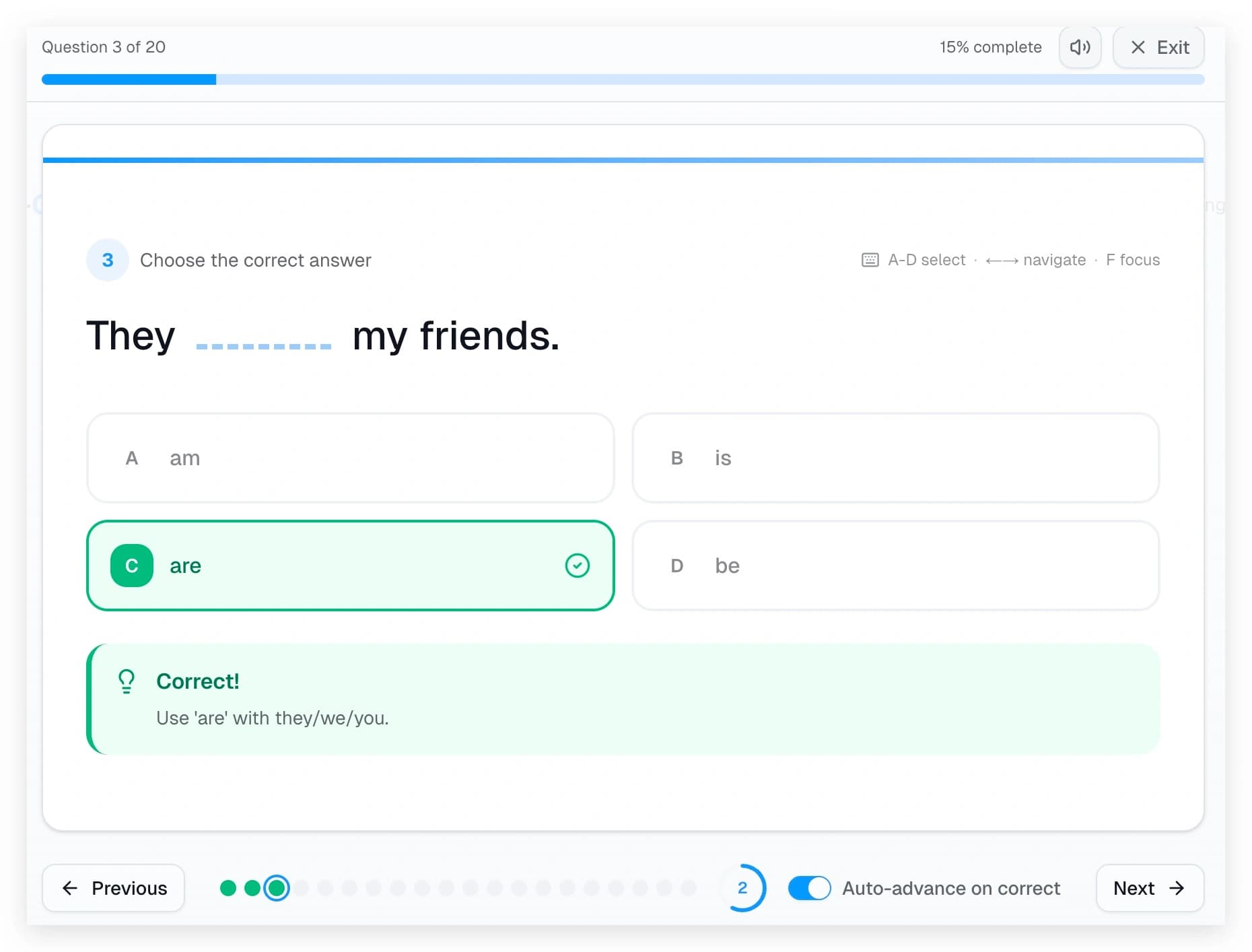
Almost none supported keyboard shortcuts. If you’ve ever watched a child (or an adult) practice hundreds of questions, you know how much friction a mouse click adds. Being able to hit “A” to select option A, then arrow-right to move to the next question—that’s the difference between 10 questions and 50 questions in the same time.
And very few offered systematic, layered explanations. Grammar isn’t just about memorizing rules; it’s about understanding why. When a learner gets something wrong, they shouldn’t have to open a new tab and search for explanations. The feedback should be right there, in context.
So I Built One
English Grammar App started as a tool for my own family—a place where my daughter could practice grammar with the kind of experience I wished existed.
The core design principles were simple:
1. Instant Access, Zero Friction
No sign-up required. No email. No password. You open the site, pick a grammar topic, and start practicing. Learning shouldn’t require a 5-minute onboarding flow.
2. Keyboard-First Experience
Press A/B/C/D to select answers. Use arrow keys to navigate between questions. Press F to enter focus mode. These aren’t power-user features—they’re essential for anyone who wants to practice efficiently.
3. Immediate, Contextual Feedback
When you answer a question, you instantly see whether you’re right or wrong. More importantly, you see why. Every question has a detailed explanation that appears right there, no clicking away required.
4. Gamified Without Being Childish
Sound effects. Progress bars. Countdown timers. Auto-advance on correct answers. A completion screen with your score and encouraging feedback. These elements make practice feel like a game, but without cartoon characters or distracting animations.
5. Completely Free
This is a GraceOrbit project. Our philosophy has always been about making learning accessible. Grammar practice is too fundamental to be locked behind a subscription.
15 Categories, From Tenses to Connectors
The app currently covers 15 grammar categories:
- Tenses — All 12 English tenses
- Modal Verbs — can, could, may, might, must, should…
- Conditionals & Subjunctive — If clauses and hypotheticals
- Passive Voice & Causatives
- Reported Speech
- Verb Forms & Phrasal Verbs
- Clauses — Relative, noun, and clause structures
- Pronouns
- Determiners & Quantifiers
- Adjectives & Adverbs
- Prepositions
- Nouns & Possessives
- Questions & Sentence Structure
- Connectors & Discourse Markers
- There is/are
Each category contains multiple topics, and each topic has exercise sets with 20 questions. The difficulty levels follow the CEFR framework (A1 to C1), so learners can find appropriate challenges regardless of their current level.
Multiple Practice Modes
Not everyone learns the same way (as my daughter taught me), so the app offers different modes:
Multiple Choice — Quick, keyboard-friendly, with instant feedback. Great for building pattern recognition.
Worksheet Mode — Fill-in-the-blank exercises that require you to type the answer. Better for deeper recall.
PDF Downloads — For teachers, parents, or anyone who prefers paper. Print a worksheet, practice offline, then check your answers.
GraceOrbit’s Philosophy in Practice
When I wrote about creating GraceOrbit, I talked about building tools that offer patience instead of pressure, personalization instead of standardization, and encouragement instead of judgment.
English Grammar App is that philosophy made concrete:
- Patience: Practice at your own pace. No timers pushing you. No penalties for wrong answers. Just learn.
- Personalization: Choose your level. Choose your topic. Choose your mode. The tool adapts to you.
- Encouragement: “Excellent!”, “Good job!”, “Keep practicing!” — not “You failed” or “Try harder.”
What’s Next
The app is still in beta. I’m continuously adding more exercises and refining the experience. Some things I’m working on:
- More exercise sets for each topic
- Better explanations with example sentences
- Progress tracking (optional, still free)
- More languages for UI
If you or someone you know is learning English grammar—whether a child, an adult, or anyone in between—I’d love for you to try English Grammar App and tell me what you think.
This is only the beginning.